Intro
When I encountered an unfamiliar word while watching YouTube videos or immersing myself in other English content on the Internet, I would open Cambridge Dictionary and look up the word.
It would tell me how to pronounce, its meanings, and usually a few examples for each meaning.
It's a super helpful service. It does a really great job.
There are phonetic transcriptions for both British and American English, along with detailed explanations and examples. This is a really great way for me to learn pronunciation and expand my vocabulary in the end.
The problem is, as a note taker, I constantly struggled to save the content to my own notebook or something. I had to take a screenshot, which was not edit-friendly, or I should say impossible if I wanted to refine that piece of content later on; Or I had to copy the text from the webpage and do some heavy lifting of editing with the text, which was super time-consuming.
And I couldn't find anything that could help me with that.
So why don't I roll up my sleeves and make one for that purpose?
The LanguagePuppy Extension
So I spent a few nights researching its websites, how the content was organized, etc., and how to extract the valuable stuff from the pages.
Finally, I came up with an easy-to-use Chrome extension.
We need to install the extension first. After installation, we can click to copy all the explanations into Markdown.
But what on earth is Markdown? More on that later.
How to use it step by step?
- We need to install it on our PC Chrome browser. Search for "LanguagePuppy" on Chrome Web Store, or just hit this link of the extension to open the page, and then click the "Add to Chrome" button.
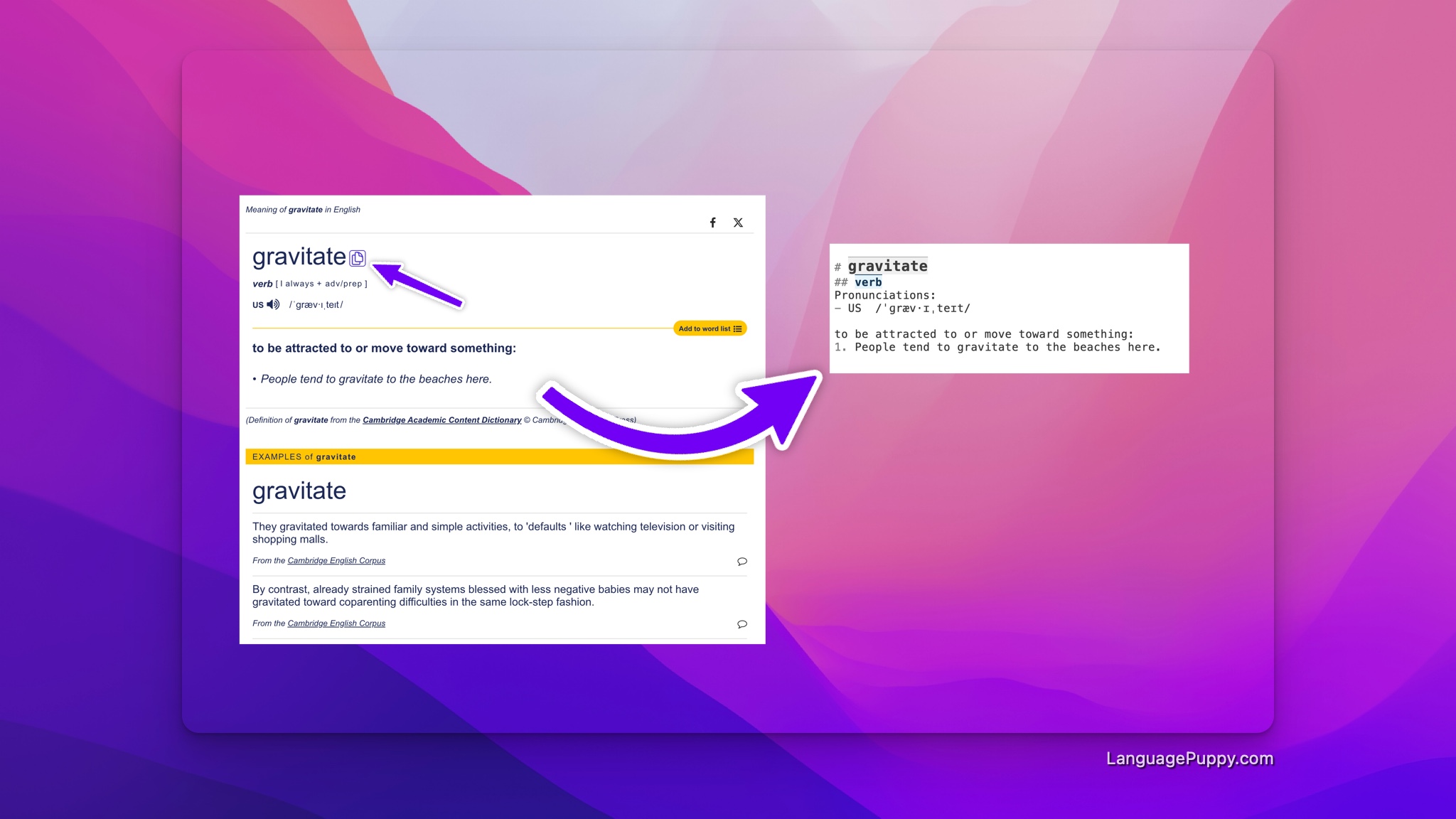
- Looking up: now open the Cambridge Dictionary website, look up a word, for example, gravitate; You'll find that there is a little "copy" icon next to the word at the top of the page.
- Copy: click the copy button next to the word If copied successfully, it will tell you that by popping up a message.
- Paste: open your notebook software or service, paste it in from the clipboard. I usually paste it into the notes I took while watching YouTube videos.
Although it may look like quite a lot of steps, it's actually not hard to complete after you get familiar with it.
Case studies
Here are a few examples from my notes on the YouTube video Let's Learn English Around the House and Home, to give an idea of what the content looks like in your clipboard.
You may notice that the results are not perfect. You're absolutely right, I'm polishing it, and I'll release an update when I'm done.
Case 1: kettle
# kettle
## Default Dictionary
### noun
Pronunciations:
- UK  /ˈket.əl/
- US  /ˈket̬.əl/

#### kettle noun [C] (EQUIPMENT)
a container for boiling water, that has a lid, handle, and spout and is made from plastic or metal

#### kettle noun [C] (POLICE)
an occasion when police form lines around a crowd of people and prevent them from leaving a particular area

### verb
Pronunciations:
- UK  /ˈket.əl/
- US  /ˈket̬.əl/

####
If the police kettle a crowd of people, they form lines around them and prevent them from leaving a particular area.

## AMERICAN DICTIONARY
### noun
Pronunciations:
- US  /ˈket̬·əl/

####
a covered container with a handle and a spout (= opening for pouring), used for boiling water
Case 2: barbecue
# barbecue
## Default Dictionary
### noun
Pronunciations:
- UK  /ˈbɑː.bɪ.kjuː/
- US  /ˈbɑːr.bə.kjuː/

####
a metal frame on which meat, fish, or vegetables are cooked outdoors over a fire:
1. Make sure you light the barbecue in plenty of time.

a meal that is prepared and eaten outdoors using such a frame, often during a party:
1. He made some salads to have with the barbecue.

a party held outdoors, during which food is cooked on a barbecue:
1. We're having a barbecue on Saturday - I hope you can come.

meat, usually pork, cooked slowly on a metal frame in a container filled with smoke, and served in a barbecue sauce :
1. They serve the best barbecue in town.

### verb
Pronunciations:
- UK  /ˈbɑː.bɪ.kjuː/
- US  /ˈbɑːr.bə.kjuː/

####
to cook food on a barbecue:
1. Their traditional sausages are delicious grilled or barbecued.
2. Dad was outside barbecuing in the yard.

## AMERICAN DICTIONARY
### noun
Pronunciations:
- US  /ˈbɑr·bɪˌkju/
- US  /ˈbɑr·bɪˌkju/

####
a metal frame on which food is cooked outside over a fire, or a meal prepared using such a frame and usually eaten outside:
1. I like catfish cooked on a barbecue.
2. Our neighbors invited all of us to a backyard barbecue.
Well, what the heck is Markdown?
According to Wikipedia: "Markdown is a lightweight markup language for creating formatted text using a plain-text editor."
It's widely supported, for example, you can post in Markdown on Reddit.
It may sound abstract to your ears if you haven't heard of it before, which is entirely understandable.
Here are a few examples to help you get a sense:
- You can write things like
# headline 1and## headline 1.1for first and second level of headlines. Yes, the number of#indicates the headline level. - Bold some text by using
**bold text** - Italicize text with
*italicized text* - And, use
---(three dashes) for horizontal rules
If this doesn't sound interesting to you, move on; all you have to know is that it uses some basic rules to make your text content clean and structured.
If you don't feel like learning the rules, you can treat the copied content just like any other text you type.
FAQs
Do I need to pay for it?
No, you don't need a subscription or anything to use it; it's free. Just install the extension, and start copying and pasting right away.
To provide a better experience, we may require sign-up in the future.
Why not just copy and paste from the website?
Obviously, the simplest way to save the dictionary explanations for later editing and review is to copy and paste the content ourselves. I have been using it this way for quite a while.
The problem is, it takes a lot of time and energy from us to get it clean and right. We have to remove redundant UI text like "Add to your word list" and adjust the formatting to give it a better look.
Why don't we just take screenshots?
Yes, it could be a solution if you don't need to edit the dictionary content in the future.
It doesn't work. As a note taker, I would like to freely add or update the explanations when I review them down the road.
The editing process can help me become more familiar with the vocabulary I'm learning.
Does it work on all dictionaries on the Cambridge Dictionary?
First, I thought it should. But after some verification, I found it didn't.
Currently, it only works for the English dictionary, because that's what I use day to day. Without any translations, it helps me get more exposed to English.
I'm using the "XYZ" Dictionary instead of the Cambridge Dictionary. Any plans to support it?
At the moment, only the Cambridge Dictionary is supported. Comment below about what you're using for looking up words. I'll add support to the frequently used ones.
What other functions does the Chrome extension have?
Besides copying as Markdown for Cambridge Dictionary, we also have features to help self-learners improve English listening and speaking skills by watching YouTube videos and taking notes for scientific review.
Head over to Feature Overview to have a peek at the features.
Conclusion
That's the simple yet useful tool we've developed for Cambridge Dictionary. With it, you can take better notes and keep a clean notebook for later review.
If you encounter any issues with it, you can leave a comment below or contact us via the links at the bottom of the page.